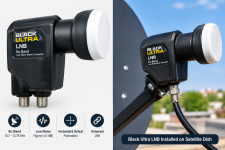

The Black Ultra LNB is a popular topic among satellite TV enthusiasts who want reliable signal reception and better performance from their satellite dishes. Choosing the right LNB is important for receiving satellite channels with good signal quality and fewer interruptions.
Whether you are a beginner or an experienced satellite installer, understanding how a Black Ultra LNB works can help you get better results from your satellite system.
In this article, we will explain the Black Ultra LNB in simple English, including its features, benefits, installation process, compatibility, and tips for improving satellite signal quality.
The LNB is installed at the front of the satellite dish, where it collects signals reflected by the dish.
The Black Ultra LNB is discussed by satellite hobbyists looking for good reception performance. However, its actual performance depends on the exact model, dish size, satellite signal strength, and installation quality.
A good LNB, combined with correct dish alignment, can help provide stable satellite reception.
The Black Ultra LNB may be suitable for different satellite reception setups, depending on its specifications. Here are some important features to consider.
One of the main reasons people upgrade their LNB is to improve satellite signal reception.
A suitable LNB can help receive signals from supported satellites when used with a properly aligned dish. However, changing the LNB alone does not guarantee better reception.
Dish alignment, cable quality, weather conditions, and the satellite's coverage in your area also affect performance.
The noise figure is an important specification when choosing an LNB.
A lower noise figure can help preserve weak signals, although the overall design and real-world performance of the LNB are also important.
Before buying a Black Ultra LNB, check its official specifications and compare them with other available models.
Compatibility is another important factor when choosing an LNB.
Depending on the specific model, a suitable LNB may work with compatible satellite receivers, including:
Ķì
Always check the manufacturer's specifications to ensure that the LNB matches your receiver and satellite system.
Satellite channels can use horizontal and vertical polarization.
A standard universal Ku-band LNB supports switching between these polarizations through control signals from the receiver.
Correct receiver settings are necessary to receive the expected channels and transponders.
Hotbird 13°E is a well-known satellite position used for broadcasting television and radio channels.
Many satellite enthusiasts use dishes pointed toward Hotbird to receive available broadcasts.
If you want to use a Black Ultra LNB for Hotbird 13°E, you should pay attention to several important factors.
Dish size: Choose a dish that is suitable for the signal strength and coverage in your location.
Dish alignment: Make sure the dish is accurately pointed toward Hotbird 13°E.
LNB position: Place the LNB correctly in the dish holder and adjust its rotation according to your location.
Cable quality: Use good-quality coaxial cable to reduce connection problems.
Receiver settings: Configure the correct LNB type and local oscillator frequencies.
These steps can help improve reception and reduce signal problems.
Remember that signal strength varies between transponders. Some channels may have stronger signals than others, even when using the same dish and LNB.
Installing an LNB correctly is important for achieving good satellite reception.
Follow these simple steps.
Before installation, inspect your satellite dish.
Make sure the dish is not damaged and that its mounting brackets are secure. A loose dish can move in strong winds and cause signal loss.
Disconnect the coaxial cable from the existing LNB.
Carefully remove the old device from the dish holder. Avoid damaging the cable or the mounting bracket.
Place the Black Ultra LNB into the dish holder.
Make sure it is secure and correctly positioned at the dish's focal point. The correct position depends on the dish design and the LNB model.
Connect the coaxial cable to the LNB.
Ensure that the connector is fitted properly and that the cable is in good condition. Poor connections can cause signal loss or intermittent reception.
Open the satellite settings menu on your receiver.
For a conventional universal Ku-band LNB, the usual local oscillator settings are:
Check your LNB specifications before applying these settings, as not every model uses the same configuration.
Use your receiver's signal-quality meter to fine-tune the dish position.
Move the dish slowly and make small adjustments. Wait for the signal-quality reading to update after each movement.
Correct alignment is one of the most important factors in achieving stable reception.
If you want better results from your Black Ultra LNB, follow these practical tips.
1. Use the correct dish size. A dish that is too small may not provide sufficient signal strength for weaker transponders.
2. Check the LNB position. Incorrect positioning can reduce reception quality.
3. Use good-quality cable. Damaged cables and loose connectors can cause signal problems.
4. Adjust the dish carefully. Even a small alignment error can affect reception, especially with weaker signals.
5. Check receiver settings. Incorrect LNB frequencies or satellite settings can prevent proper reception.
6. Inspect connections after bad weather. Rain and moisture can damage outdoor connections over time.
7. Compare signal quality. Check the same transponder before and after making adjustments to evaluate any improvement.
These simple steps can help you identify and solve many common satellite reception problems.
Even when you use a good-quality LNB, you may sometimes experience signal problems.
A no-signal problem can result from incorrect receiver settings, a damaged cable, a faulty LNB, or poor dish alignment.
Check the connections and make sure the receiver is configured for the correct satellite.
Weak signal quality may be caused by inaccurate dish alignment, unsuitable dish size, poor connections, or obstructions.
Try adjusting the dish and checking the cable before replacing the LNB.
If some channels work while others do not, check the transponder frequencies, symbol rates, polarization, and availability of the broadcasts.
Incorrect LNB settings may also cause tuning problems.
Heavy rain can weaken Ku-band satellite signals.
A correctly aligned dish and suitable dish size can help reduce interruptions, but severe weather may still affect reception.
The Black Ultra LNB may be worth considering if you want to upgrade your satellite reception system.
However, you should compare the exact model's specifications before buying it. Look at its noise figure, supported frequency range, compatibility, and suitability for your satellite dish.
If your existing LNB is damaged or unsuitable, replacing it may improve reception.
If your current system already works well, changing the LNB may not make a noticeable difference.
For the best results, focus on the complete installation rather than the LNB alone.
The Black Ultra LNB is an option worth exploring for satellite TV enthusiasts who want reliable reception and a properly configured satellite system.
To achieve good results, choose a compatible LNB, use a suitable satellite dish, install good-quality cable, and align the dish carefully.
Whether you receive Hotbird 13°E or another supported satellite, correct installation and receiver settings can make a significant difference.
Before purchasing a Black Ultra LNB, check the manufacturer's specifications and choose a model that matches your requirements.
With the right equipment and careful setup, you can enjoy a more reliable satellite TV experience.
Whether you are a beginner or an experienced satellite installer, understanding how a Black Ultra LNB works can help you get better results from your satellite system.
In this article, we will explain the Black Ultra LNB in simple English, including its features, benefits, installation process, compatibility, and tips for improving satellite signal quality.
What Is a Black Ultra LNB?
An LNB stands for Low-Noise Block Downconverter. It is an important part of a satellite dish system that receives signals from a satellite and converts them into frequencies that a satellite receiver can process.The LNB is installed at the front of the satellite dish, where it collects signals reflected by the dish.
The Black Ultra LNB is discussed by satellite hobbyists looking for good reception performance. However, its actual performance depends on the exact model, dish size, satellite signal strength, and installation quality.
A good LNB, combined with correct dish alignment, can help provide stable satellite reception.
Main Features of the Black Ultra LNB
The Black Ultra LNB may be suitable for different satellite reception setups, depending on its specifications. Here are some important features to consider.
1. Satellite Signal Reception
One of the main reasons people upgrade their LNB is to improve satellite signal reception.
A suitable LNB can help receive signals from supported satellites when used with a properly aligned dish. However, changing the LNB alone does not guarantee better reception.
Dish alignment, cable quality, weather conditions, and the satellite's coverage in your area also affect performance.
2. Low-Noise Technology
The noise figure is an important specification when choosing an LNB.
A lower noise figure can help preserve weak signals, although the overall design and real-world performance of the LNB are also important.
Before buying a Black Ultra LNB, check its official specifications and compare them with other available models.
3. Compatibility With Satellite Receivers
Compatibility is another important factor when choosing an LNB.
Depending on the specific model, a suitable LNB may work with compatible satellite receivers, including:
Ķì
- DVB-S and DVB-S2 receivers
- Enigma2 satellite receivers
- OpenATV receivers
- Other receivers that support the appropriate LNB
Always check the manufacturer's specifications to ensure that the LNB matches your receiver and satellite system.
4. Support for Different Polarizations
Satellite channels can use horizontal and vertical polarization.
A standard universal Ku-band LNB supports switching between these polarizations through control signals from the receiver.
Correct receiver settings are necessary to receive the expected channels and transponders.
Black Ultra LNB for Hotbird 13°E
Hotbird 13°E is a well-known satellite position used for broadcasting television and radio channels.
Many satellite enthusiasts use dishes pointed toward Hotbird to receive available broadcasts.
If you want to use a Black Ultra LNB for Hotbird 13°E, you should pay attention to several important factors.
Dish size: Choose a dish that is suitable for the signal strength and coverage in your location.
Dish alignment: Make sure the dish is accurately pointed toward Hotbird 13°E.
LNB position: Place the LNB correctly in the dish holder and adjust its rotation according to your location.
Cable quality: Use good-quality coaxial cable to reduce connection problems.
Receiver settings: Configure the correct LNB type and local oscillator frequencies.
These steps can help improve reception and reduce signal problems.
Remember that signal strength varies between transponders. Some channels may have stronger signals than others, even when using the same dish and LNB.
How to Install a Black Ultra LNB
Installing an LNB correctly is important for achieving good satellite reception.
Follow these simple steps.
Step 1: Check Your Satellite Dish
Before installation, inspect your satellite dish.
Make sure the dish is not damaged and that its mounting brackets are secure. A loose dish can move in strong winds and cause signal loss.
Step 2: Remove the Old LNB
Disconnect the coaxial cable from the existing LNB.
Carefully remove the old device from the dish holder. Avoid damaging the cable or the mounting bracket.
Step 3: Install the Black Ultra LNB
Place the Black Ultra LNB into the dish holder.
Make sure it is secure and correctly positioned at the dish's focal point. The correct position depends on the dish design and the LNB model.
Step 4: Connect the Cable
Connect the coaxial cable to the LNB.
Ensure that the connector is fitted properly and that the cable is in good condition. Poor connections can cause signal loss or intermittent reception.
Step 5: Configure Your Receiver
Open the satellite settings menu on your receiver.
For a conventional universal Ku-band LNB, the usual local oscillator settings are:
- Low frequency: 9750 MHz
- High frequency: 10600 MHz
- 22 kHz tone: Auto
Check your LNB specifications before applying these settings, as not every model uses the same configuration.
Step 6: Adjust the Dish
Use your receiver's signal-quality meter to fine-tune the dish position.
Move the dish slowly and make small adjustments. Wait for the signal-quality reading to update after each movement.
Correct alignment is one of the most important factors in achieving stable reception.
Tips to Improve Satellite Signal Quality
If you want better results from your Black Ultra LNB, follow these practical tips.
1. Use the correct dish size. A dish that is too small may not provide sufficient signal strength for weaker transponders.
2. Check the LNB position. Incorrect positioning can reduce reception quality.
3. Use good-quality cable. Damaged cables and loose connectors can cause signal problems.
4. Adjust the dish carefully. Even a small alignment error can affect reception, especially with weaker signals.
5. Check receiver settings. Incorrect LNB frequencies or satellite settings can prevent proper reception.
6. Inspect connections after bad weather. Rain and moisture can damage outdoor connections over time.
7. Compare signal quality. Check the same transponder before and after making adjustments to evaluate any improvement.
These simple steps can help you identify and solve many common satellite reception problems.
Common Problems With an LNB
Even when you use a good-quality LNB, you may sometimes experience signal problems.
No Signal
A no-signal problem can result from incorrect receiver settings, a damaged cable, a faulty LNB, or poor dish alignment.
Check the connections and make sure the receiver is configured for the correct satellite.
Weak Signal
Weak signal quality may be caused by inaccurate dish alignment, unsuitable dish size, poor connections, or obstructions.
Try adjusting the dish and checking the cable before replacing the LNB.
Some Channels Are Missing
If some channels work while others do not, check the transponder frequencies, symbol rates, polarization, and availability of the broadcasts.
Incorrect LNB settings may also cause tuning problems.
Signal Loss During Rain
Heavy rain can weaken Ku-band satellite signals.
A correctly aligned dish and suitable dish size can help reduce interruptions, but severe weather may still affect reception.
Is the Black Ultra LNB Worth Buying?
The Black Ultra LNB may be worth considering if you want to upgrade your satellite reception system.
However, you should compare the exact model's specifications before buying it. Look at its noise figure, supported frequency range, compatibility, and suitability for your satellite dish.
If your existing LNB is damaged or unsuitable, replacing it may improve reception.
If your current system already works well, changing the LNB may not make a noticeable difference.
For the best results, focus on the complete installation rather than the LNB alone.
Conclusion
The Black Ultra LNB is an option worth exploring for satellite TV enthusiasts who want reliable reception and a properly configured satellite system.
To achieve good results, choose a compatible LNB, use a suitable satellite dish, install good-quality cable, and align the dish carefully.
Whether you receive Hotbird 13°E or another supported satellite, correct installation and receiver settings can make a significant difference.
Before purchasing a Black Ultra LNB, check the manufacturer's specifications and choose a model that matches your requirements.
With the right equipment and careful setup, you can enjoy a more reliable satellite TV experience.