
Dreambox Control Center 2.95: Download, Features, Installation, and Complete Setup Guide
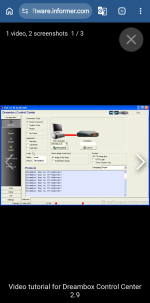
Dreambox Control Center 2.95 (DCC) is a free software utility designed to help users manage compatible Dreambox satellite receivers through a Windows computer. It offers useful features such as network configuration, FTP file transfers, file management, and script editing. For satellite enthusiasts, DCC can make receiver maintenance easier and more convenient.
In this article, we will explore the main features of Dreambox Control Center 2.95, explain how to download and install it, and provide helpful tips for connecting your computer to a Dreambox receiver.
Dreambox Control Center 2.95 is a receiver management application developed by BernyR. It allows users to communicate with compatible Dreambox receivers over a network.
The software provides a graphical interface for performing common tasks, including transferring files, configuring network settings, and managing supported scripts.
Instead of relying entirely on a receiver's remote control, users can connect their Dreambox to a computer and perform supported operations through the DCC interface.
The application is particularly useful for maintaining older Dreambox receivers and compatible software images. However, compatibility with modern Windows versions and newer receiver firmware may vary.
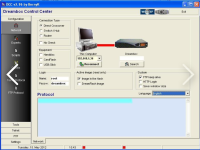
Network configuration is one of the main features of DCC 2.95. The software allows users to configure the connection between their computer and a compatible Dreambox receiver.
Its network options include:
These options help users establish a connection without complicated manual configuration.
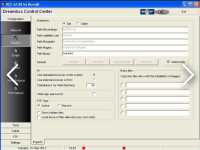
Dreambox Control Center includes FTP functionality for transferring files between a computer and a compatible receiver.
Users can upload files to the receiver, download files to their computers, and manage accessible directories.
The software also supports drag-and-drop operations, making file transfers more convenient.
Before replacing or editing important receiver files, always create a backup to prevent accidental data loss.
DCC 2.95 includes a Scripts section for working with supported scripts.
Scripts can automate certain tasks, depending on the receiver's software environment. The application allows supported script modifications, and changes are saved permanently.
However, incorrect modifications can cause receiver functions to stop working properly. Beginners should avoid editing unfamiliar scripts without creating a backup.
The software can display information about an active DreamFlash image in supported environments.
DreamFlash was associated with older Dreambox systems that allowed users to work with different receiver images.
This feature is primarily relevant to compatible legacy installations. Not every modern Enigma2 receiver supports DreamFlash or all DCC functions.
The graphical interface makes file management easier for users who are unfamiliar with FTP commands.
Depending on the receiver's configuration, users can browse accessible directories, upload files, download files, and manage supported content.
Always check the destination directory before transferring files because modifying essential system files can cause unexpected problems.
Before installing Dreambox Control Center 2.95, consider these basic requirements:
DCC 2.95 is an older application, so compatibility with Windows 10 and Windows 11 is not guaranteed.
Dreambox Control Center 2.95 has been listed as freeware developed by BernyR.
You can review the software information and available downloads through these pages:
Software Information:
https://dreambox-control-center.software.informer.com/
Download Page:
https://dreambox-control-center.software.informer.com/download/
Before downloading, verify that the file corresponds to the intended software version. Scan the downloaded file with reputable security software, and avoid suspicious installers or unrelated programs.
Follow these general steps to install the software:
Step 1: Download the application from a source you trust.
Step 2: If the downloaded file is a compressed archive, extract its contents using a trusted utility.
Step 3: If an installer is provided, open it and follow the installation instructions.
Step 4: Launch Dreambox Control Center after installation.
Step 5: Open the Network section to configure the connection to your receiver.
If the application does not start, check its compatibility with your Windows version. Older software may require additional troubleshooting.
Connecting the application to your receiver requires the correct network settings.
Connect your computer and Dreambox receiver to the same local network, preferably through your router.
Open your Dreambox network settings and locate its IPv4 address.
Launch DCC 2.95 and select Network.
Enter the receiver's IP address manually or use the available automatic search function.
Provide the username and password required by your receiver.
Attempt to connect. If the connection fails, check the IP address, network cables, credentials, firewall settings, and receiver services.
Dreambox not detected: Make sure both devices are connected to the same network and try entering the receiver's IP address manually.
FTP connection failed: Check your login credentials and confirm that the receiver's FTP service is enabled.
Connection timeout: Verify that the receiver is powered on and that its IP address has not changed.
File upload failed: Check the destination directory, available storage space, and file permissions.
DCC does not start on Windows 11: Try appropriate compatibility settings if necessary, but remember that successful operation is not guaranteed.
For security, avoid disabling antivirus protection simply to run an untrusted application.
Compatibility depends on the receiver model, installed image, and available network services.
Some Enigma2 receivers may support DCC's network and file transfer functions, while other features may not work correctly.
If DCC does not support your receiver, consider a compatible FTP client or another management tool recommended for your installed image.
DCC 2.95 offers several benefits:
These features can be particularly helpful for users maintaining compatible older Dreambox systems.
Is Dreambox Control Center 2.95 free?
Yes. It has been listed as freeware.
Who developed DCC 2.95?
The software is listed as being developed by BernyR.
Can DCC transfer files?
Yes. Its FTP functionality supports file transfers between a computer and compatible receivers.
Does it work with Windows 11?
Compatibility is not guaranteed because DCC 2.95 is an older application.
Can beginners use DCC?
Yes. Beginners can use it for basic network configuration and file transfers, but should avoid changing unfamiliar system files.
Dreambox Control Center 2.95 is a useful legacy utility for managing compatible Dreambox satellite receivers. Its network configuration tools, FTP functionality, file management interface, and script editing features can simplify common receiver maintenance tasks.
Before using the application, verify the download source, check compatibility with your receiver, and back up important files. With the correct configuration, DCC 2.95 can make managing a compatible Dreambox receiver more convenient
Dreambox Control Center 2.95 (DCC) is a free software utility designed to help users manage compatible Dreambox satellite receivers through a Windows computer. It offers useful features such as network configuration, FTP file transfers, file management, and script editing. For satellite enthusiasts, DCC can make receiver maintenance easier and more convenient.
In this article, we will explore the main features of Dreambox Control Center 2.95, explain how to download and install it, and provide helpful tips for connecting your computer to a Dreambox receiver.
What Is Dreambox Control Center 2.95?
Dreambox Control Center 2.95 is a receiver management application developed by BernyR. It allows users to communicate with compatible Dreambox receivers over a network.
The software provides a graphical interface for performing common tasks, including transferring files, configuring network settings, and managing supported scripts.
Instead of relying entirely on a receiver's remote control, users can connect their Dreambox to a computer and perform supported operations through the DCC interface.
The application is particularly useful for maintaining older Dreambox receivers and compatible software images. However, compatibility with modern Windows versions and newer receiver firmware may vary.
Key Features of Dreambox Control Center 2.95
1. Network Configuration
Network configuration is one of the main features of DCC 2.95. The software allows users to configure the connection between their computer and a compatible Dreambox receiver.
Its network options include:
- Automatic detection of the computer's IP address.
- Manual entry of the Dreambox IP address.
- Automatic searching for compatible receivers.
- Connection type selection.
- Username and password configuration.
- Language selection.
These options help users establish a connection without complicated manual configuration.
2. FTP File Transfer
Dreambox Control Center includes FTP functionality for transferring files between a computer and a compatible receiver.
Users can upload files to the receiver, download files to their computers, and manage accessible directories.
The software also supports drag-and-drop operations, making file transfers more convenient.
Before replacing or editing important receiver files, always create a backup to prevent accidental data loss.
3. Script Management
DCC 2.95 includes a Scripts section for working with supported scripts.
Scripts can automate certain tasks, depending on the receiver's software environment. The application allows supported script modifications, and changes are saved permanently.
However, incorrect modifications can cause receiver functions to stop working properly. Beginners should avoid editing unfamiliar scripts without creating a backup.
4. DreamFlash Image Information
The software can display information about an active DreamFlash image in supported environments.
DreamFlash was associated with older Dreambox systems that allowed users to work with different receiver images.
This feature is primarily relevant to compatible legacy installations. Not every modern Enigma2 receiver supports DreamFlash or all DCC functions.
5. Easy File Management
The graphical interface makes file management easier for users who are unfamiliar with FTP commands.
Depending on the receiver's configuration, users can browse accessible directories, upload files, download files, and manage supported content.
Always check the destination directory before transferring files because modifying essential system files can cause unexpected problems.
System Requirements
Before installing Dreambox Control Center 2.95, consider these basic requirements:
- A compatible Windows computer.
- A working network connection.
- A compatible Dreambox receiver.
- The receiver's IP address.
- Correct login credentials, if required.
- Appropriate permissions to run the application.
DCC 2.95 is an older application, so compatibility with Windows 10 and Windows 11 is not guaranteed.
How to Download Dreambox Control Center 2.95
Dreambox Control Center 2.95 has been listed as freeware developed by BernyR.
You can review the software information and available downloads through these pages:
Software Information:
https://dreambox-control-center.software.informer.com/
Download Page:
https://dreambox-control-center.software.informer.com/download/
Before downloading, verify that the file corresponds to the intended software version. Scan the downloaded file with reputable security software, and avoid suspicious installers or unrelated programs.
How to Install Dreambox Control Center 2.95
Follow these general steps to install the software:
Step 1: Download the application from a source you trust.
Step 2: If the downloaded file is a compressed archive, extract its contents using a trusted utility.
Step 3: If an installer is provided, open it and follow the installation instructions.
Step 4: Launch Dreambox Control Center after installation.
Step 5: Open the Network section to configure the connection to your receiver.
If the application does not start, check its compatibility with your Windows version. Older software may require additional troubleshooting.
How to Connect DCC 2.95 to Your Dreambox Receiver
Connecting the application to your receiver requires the correct network settings.
Step 1: Connect Both Devices
Connect your computer and Dreambox receiver to the same local network, preferably through your router.
Step 2: Find the Receiver's IP Address
Open your Dreambox network settings and locate its IPv4 address.
Step 3: Open the Network Section
Launch DCC 2.95 and select Network.
Step 4: Enter the IP Address
Enter the receiver's IP address manually or use the available automatic search function.
Step 5: Enter Login Credentials
Provide the username and password required by your receiver.
Step 6: Test the Connection
Attempt to connect. If the connection fails, check the IP address, network cables, credentials, firewall settings, and receiver services.
Common Problems and Solutions
Dreambox not detected: Make sure both devices are connected to the same network and try entering the receiver's IP address manually.
FTP connection failed: Check your login credentials and confirm that the receiver's FTP service is enabled.
Connection timeout: Verify that the receiver is powered on and that its IP address has not changed.
File upload failed: Check the destination directory, available storage space, and file permissions.
DCC does not start on Windows 11: Try appropriate compatibility settings if necessary, but remember that successful operation is not guaranteed.
For security, avoid disabling antivirus protection simply to run an untrusted application.
Is Dreambox Control Center 2.95 Compatible with Enigma2?
Compatibility depends on the receiver model, installed image, and available network services.
Some Enigma2 receivers may support DCC's network and file transfer functions, while other features may not work correctly.
If DCC does not support your receiver, consider a compatible FTP client or another management tool recommended for your installed image.
Advantages of Dreambox Control Center 2.95
DCC 2.95 offers several benefits:
- Freeware availability.
- A graphical interface for receiver management.
- Network configuration options.
- FTP file transfers.
- Drag-and-drop functionality.
- Supported script editing.
- Convenient access to receiver files.
These features can be particularly helpful for users maintaining compatible older Dreambox systems.
Frequently Asked Questions
Is Dreambox Control Center 2.95 free?
Yes. It has been listed as freeware.
Who developed DCC 2.95?
The software is listed as being developed by BernyR.
Can DCC transfer files?
Yes. Its FTP functionality supports file transfers between a computer and compatible receivers.
Does it work with Windows 11?
Compatibility is not guaranteed because DCC 2.95 is an older application.
Can beginners use DCC?
Yes. Beginners can use it for basic network configuration and file transfers, but should avoid changing unfamiliar system files.
Conclusion
Dreambox Control Center 2.95 is a useful legacy utility for managing compatible Dreambox satellite receivers. Its network configuration tools, FTP functionality, file management interface, and script editing features can simplify common receiver maintenance tasks.
Before using the application, verify the download source, check compatibility with your receiver, and back up important files. With the correct configuration, DCC 2.95 can make managing a compatible Dreambox receiver more convenient