

Zgemma Latest Model 2026: Zgemma H11S and H9 Twin SE - Full Review and Setup Guide
Zgemma new update model H11S and H9 Twin SE review. Check specs, features, setup, and which Zgemma box is best for you in 2026.
Zgemma Latest Model 2026 - What Is New?
Zgemma has made big improvements in its new update models. If you are still using the old H7 or H9S, the new Zgemma H11S and Zgemma H9 Twin SE are the best upgrades for you.
In this article, we will review both models in detail.
1. Zgemma H11S - Latest Single Tuner Model
The H11S is currently the newest and most popular model from Zgemma.
Specifications:
Processor: HiSilicon Quad-Core ARM
Resolution: 4K UHD 2160p - HEVC / H.265 Support
Tuner: 1x DVB-S2X Satellite Tuner
RAM / Storage: 1GB DDR + 8GB eMMC
OS: Enigma2 Linux OS
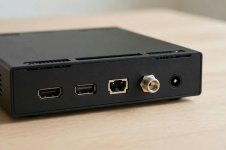
Ports: HDMI, 2x USB, 1 Gbit LAN, Card Reader
WiFi: Built-in WiFi Support
Who Is It Best For?
If you have only one dish and you want 4K quality, the H11S is best for you. It is fast, it does not hang, and its price is also low.
2. Zgemma H9 Twin SE - Latest Twin Tuner Model
If you want to do two tasks at the same time, then choose the H9 Twin SE.
Specifications:
Processor: Quad-Core ARM
Resolution: 4K UHD HEVC
Tuner: Twin Tuner - 2x DVB-S2X
RAM / Storage: 1GB DDR + 8GB eMMC
OS: Enigma2 + Android Dual OS
Ports: HDMI, USB, 1 Gbit LAN, SATA for HDD
Extra: Smartcard Reader + CI Slot
Who Is It Best For?
With this box, you can watch one channel and record another channel at the same time. If you have 2 dishes or 2 LNBs at home, this model is best for you.
Zgemma H11S vs H9 Twin SE - Difference
Tuner: H11S Single, H9 Twin SE Twin
Recording: H11S 1 Channel, H9 Twin SE 2 Channels
Price: H11S Low, H9 Twin SE Medium
Best For: H11S Normal Use, H9 Twin SE Advanced Use
If your use is normal, the H11S is enough. If you record a lot, then take the H9 Twin SE.
How To Setup Zgemma Box? - 5 Minute Guide
Step 1: Connect the dish cable to the LNB IN port of the box.
Step 2: Connect the box to the TV with an HDMI cable.
Step 3: Turn on the power and connect to WiFi.
Step 4: Go to Menu, Setup, Service Searching, Tuner Configuration and select your satellite.
Step 5: Run Automatic Scan, your channels will appear.
Tips To Keep Your Zgemma Box Fast
Always keep the box on its official software.
Do not install unnecessary plugins.
Restart the box once a week.
Keep the box in a ventilated place, do not keep it in a hot place.
Should You Buy A Zgemma Box In 2026?
Yes, if you need a satellite receiver that is fast, supports 4K, and runs on Enigma2, then the Zgemma H11S is the best choice in 2026. It is affordable and it has good support.
Frequently Asked Questions
Q1. Which is the latest Zgemma model in 2026?
Zgemma H11S is the latest single tuner model, and H9 Twin SE is the latest twin tuner model.
Q2. Does Zgemma H11S support 4K?
Yes, it supports 4K UHD 2160p with HEVC / H.265.
Q3. Which is better, H11S or H9 Twin SE?
For normal home use, H11S is better. For recording and 2 dishes, H9 Twin SE is better.
Q4. Is Zgemma easy to setup?
Yes, setup takes only 5 minutes. Just connect dish cable and HDMI, then scan channels.
Final Conclusion
If you want to buy a new Zgemma in 2026, take the H11S for simple use, and the H9 Twin SE for advanced use. Both models support 4K and Enigma2, both are fast and reliable.
So, which Zgemma model are you using? Tell us your model in the comments below, and share this article with your friends who are planning to buy a new box.
Gigablue x34k Box
Sku:gb-uhd-x3-4k
The new Gibablue UHD X3 4K. Dual FBC-DVB-S2X tuners, 1 Ci, 1 card reader, LAN connection, 1 HDMI and 3 USB interfaces distinguish the new series from its predecessor. TV receiver FBC Twin Linux HD. DVB-S2/S2X and IPTV offer a wide range of uses
Zgemma new update model H11S and H9 Twin SE review. Check specs, features, setup, and which Zgemma box is best for you in 2026.
Zgemma Latest Model 2026 - What Is New?
Zgemma has made big improvements in its new update models. If you are still using the old H7 or H9S, the new Zgemma H11S and Zgemma H9 Twin SE are the best upgrades for you.
In this article, we will review both models in detail.
1. Zgemma H11S - Latest Single Tuner Model
The H11S is currently the newest and most popular model from Zgemma.
Specifications:
Processor: HiSilicon Quad-Core ARM
Resolution: 4K UHD 2160p - HEVC / H.265 Support
Tuner: 1x DVB-S2X Satellite Tuner
RAM / Storage: 1GB DDR + 8GB eMMC
OS: Enigma2 Linux OS
Ports: HDMI, 2x USB, 1 Gbit LAN, Card Reader
WiFi: Built-in WiFi Support
Who Is It Best For?
If you have only one dish and you want 4K quality, the H11S is best for you. It is fast, it does not hang, and its price is also low.
2. Zgemma H9 Twin SE - Latest Twin Tuner Model
If you want to do two tasks at the same time, then choose the H9 Twin SE.
Specifications:
Processor: Quad-Core ARM
Resolution: 4K UHD HEVC
Tuner: Twin Tuner - 2x DVB-S2X
RAM / Storage: 1GB DDR + 8GB eMMC
OS: Enigma2 + Android Dual OS
Ports: HDMI, USB, 1 Gbit LAN, SATA for HDD
Extra: Smartcard Reader + CI Slot
Who Is It Best For?
With this box, you can watch one channel and record another channel at the same time. If you have 2 dishes or 2 LNBs at home, this model is best for you.
Zgemma H11S vs H9 Twin SE - Difference
Tuner: H11S Single, H9 Twin SE Twin
Recording: H11S 1 Channel, H9 Twin SE 2 Channels
Price: H11S Low, H9 Twin SE Medium
Best For: H11S Normal Use, H9 Twin SE Advanced Use
If your use is normal, the H11S is enough. If you record a lot, then take the H9 Twin SE.
How To Setup Zgemma Box? - 5 Minute Guide
Step 1: Connect the dish cable to the LNB IN port of the box.
Step 2: Connect the box to the TV with an HDMI cable.
Step 3: Turn on the power and connect to WiFi.
Step 4: Go to Menu, Setup, Service Searching, Tuner Configuration and select your satellite.
Step 5: Run Automatic Scan, your channels will appear.
Tips To Keep Your Zgemma Box Fast
Always keep the box on its official software.
Do not install unnecessary plugins.
Restart the box once a week.
Keep the box in a ventilated place, do not keep it in a hot place.
Should You Buy A Zgemma Box In 2026?
Yes, if you need a satellite receiver that is fast, supports 4K, and runs on Enigma2, then the Zgemma H11S is the best choice in 2026. It is affordable and it has good support.
Frequently Asked Questions
Q1. Which is the latest Zgemma model in 2026?
Zgemma H11S is the latest single tuner model, and H9 Twin SE is the latest twin tuner model.
Q2. Does Zgemma H11S support 4K?
Yes, it supports 4K UHD 2160p with HEVC / H.265.
Q3. Which is better, H11S or H9 Twin SE?
For normal home use, H11S is better. For recording and 2 dishes, H9 Twin SE is better.
Q4. Is Zgemma easy to setup?
Yes, setup takes only 5 minutes. Just connect dish cable and HDMI, then scan channels.
Final Conclusion
If you want to buy a new Zgemma in 2026, take the H11S for simple use, and the H9 Twin SE for advanced use. Both models support 4K and Enigma2, both are fast and reliable.
So, which Zgemma model are you using? Tell us your model in the comments below, and share this article with your friends who are planning to buy a new box.
Gigablue x34k Box

GigaBlue UHD X3 4K TV Receiver FBC Twin Linux HD DVB/S2/S2X and IPTV
Brand: GigablueSku:gb-uhd-x3-4k
The new Gibablue UHD X3 4K. Dual FBC-DVB-S2X tuners, 1 Ci, 1 card reader, LAN connection, 1 HDMI and 3 USB interfaces distinguish the new series from its predecessor. TV receiver FBC Twin Linux HD. DVB-S2/S2X and IPTV offer a wide range of uses
Features
- Fast processor with 1GB DDR4 RAM
- 4GB eMMC Flash
- 2 x USB 2.0
- 1 x Ci
- 1 x smart card
- 1 x HDMI 2.0
- 2 x FBC (DVB-S2X)
- optical out (S / PDIF)
- Ethernet LAN (RJ-45/100 Mbps)
- SAT...